
You find a ring you like on a jewelry site. The photo shows it on a plain white background, or on a hand model whose fingers look nothing like yours. So you are left guessing. Will the band look too thick? Will the stone look small on you? Does yellow gold suit your skin, or would white gold sit better?
A virtual ring try-on exists to answer that question before any money changes hands. This guide walks through how the technology actually works, what it can tell you, what it cannot, and how to get a preview that looks like your real hand instead of a sticker.
What Is a Virtual Ring Try-On?
A virtual ring try-on is a tool that shows a ring on your own hand without the ring ever being near you. You give it a photo of your hand, you pick a ring, and AI produces an image of that ring sitting on your finger.
It is not a filter that drops a flat picture of a ring over your knuckle. The software has to work out where your finger is, how it is angled, how large the ring should be, and how light is falling across your skin. Get any one of those wrong and the result looks fake straight away.
People reach for it for the same basic reason. Comparing rings on a product page is hard. Comparing them on your own hand is easy.
How Does the AI Put a Ring on Your Hand?
Four things happen in the few seconds between uploading a photo and seeing a result.
Hand mapping. The model reads your photo and locates your fingers. It picks up finger length, width, knuckle position, and the angle your hand is resting at, which tells it where a ring would naturally sit.
Sizing and placement. The ring is scaled to your finger rather than pasted in at a fixed size. This is what stops a band from looking like a bracelet on a slim finger, or like a thread on a wider one.
Lighting and shadow matching. The AI reads the light in your photo, including its direction and strength, then builds reflections and a shadow underneath the band to match.
Material rendering. Metal and stone are handled differently. Yellow gold, white gold, rose gold and platinum each catch light in their own way, and a diamond needs proper highlights and depth or it flattens into a grey shape.
On Virtual Ring Try On, all four steps run in your browser. There is no app to install and no sizing kit to wait for in the mail.
Photo Upload or Live Camera: What Is the Difference?
Try-on tools generally fall into two camps, and knowing which one you are using explains a lot about what you can expect from it.
Live camera try-on points your phone camera at your hand and places a moving ring on your finger in real time. It feels interactive, and you can turn your hand to see the ring from different angles. The trade-off is that every ring in the catalog has to be built in advance, so these tools usually carry a narrow selection.
Photo-based AI try-on works from a still picture instead. You upload a hand photo and the AI generates a new image with the ring on it. There is no live movement, but the result tends to look like an actual photograph of you, and the tool can cover far more designs because nothing needs to be built ahead of time.
Ring Try On uses the photo-based approach. That is also why you can upload a picture of a ring you found somewhere else and preview that specific design, rather than being limited to a fixed gallery. The how it works page breaks the steps down if you want to see the flow first.
Which Rings and Finger Positions Can You Preview?
Ring style is only half of the decision. Where a ring sits on your hand changes how it reads, and so does whatever you wear next to it. A plain slim band can look completely different once it is stacked with two others.
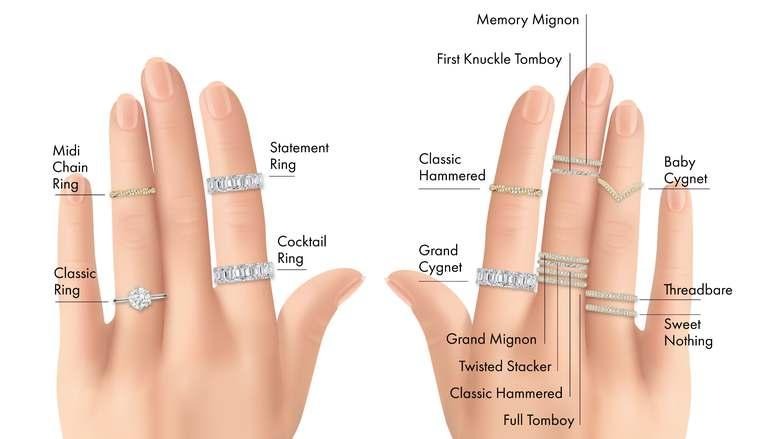
Source: beachweddingtips
A preview tool helps with both sides of that. Depending on the platform, you can usually look at:
- Engagement settings such as solitaire, halo, three-stone, bezel and vintage milgrain
- Wedding bands in yellow gold, white gold, rose gold, platinum and pave diamond
- An engagement ring and a wedding band stacked together on the same finger
- The same design on a different finger, since most tools let you choose where the ring goes
- Rings from brands you already have on your wishlist, loaded into the same preview engine
Comparing two or three shortlisted rings on a single hand photo is usually more useful than opening twenty product pages, because the hand, the lighting and the angle stay identical in every image. Only the ring changes. That is what makes a diamond ring try-on worth doing before you commit to a shape or a setting.
Can a Virtual Try-On Tell You Your Ring Size?
No, and this is the point people get wrong most often.
A preview is a visual tool. It shows you proportion, width, presence, and how a design sits against your skin tone. What it cannot give you is a number you can order by. Finger size shifts with temperature, time of day and even the season, and no photo can measure that.
So use the preview to decide what you like the look of. Then get measured properly by a jeweler, or use a reliable sizing method at home, before you order the real ring.
How Close Is It to Trying a Ring On in a Store?
Close on looks. Not close on feel.
A preview cannot tell you how heavy the metal is, how the band feels against your skin after a few hours, or how a stone behaves when you move your hand under different lighting. Those things need the real ring in your hand.
What it does handle well is the visual judgment that stops most people from buying online at all. Proportion, color and overall look are exactly the things a photo can settle for you.
Treat it as the step between browsing and buying. It cuts twenty options down to two or three, and by the time you see the real ring you already know what you are looking for.
How Do You Take a Hand Photo That Gives a Good Result?
The output depends heavily on the input. A few small habits make a visible difference:
- Use daylight where you can. Standing near a window beats overhead room lighting.
- Keep the finger you care about fully visible, with nothing crossing over it.
- Hold your hand steady and make sure it is in focus, since motion blur confuses finger detection.
- Avoid heavy shadows falling across your knuckles.
- Keep the background simple so your hand is clearly the subject.
- If you are uploading your own ring image too, use a clean, well-lit shot with the ring as the main subject and a plain background.
None of this needs a good camera. A normal phone photo taken near a window is usually all it takes.
Why Are More Shoppers Using These Tools?
The short answer is that jewelry moved online faster than the shopping experience did.
Technavio expects the jewelry market to grow by USD 107.9 billion between 2024 and 2028, with technology named as one of the forces behind that growth.

Source: Technavio
Buying a ring is not like buying a T-shirt. It often marks an engagement, a wedding or an anniversary, and it gets worn every day for years afterwards. That raises the cost of guessing wrong. Seeing the ring on your own hand removes a large part of that uncertainty, which is why previews have turned into a normal part of the process rather than a novelty.
It also makes the decision easier to share. Sending a preview to a partner, a parent or a friend gets you a straight answer, which is harder to get from a link to a product page.
Is Your Hand Photo Private?
That depends entirely on the tool, and it is worth two minutes of reading before you upload anything.
Check what happens to your image after it is processed. Do you keep ownership of it? Is it stored, and for how long? Can you delete it yourself? A trustworthy tool answers all three in plain language. Ring Try On, for example, states that you keep ownership of everything you upload and sets out how images are handled in its privacy policy. If a tool avoids the question entirely, that is a good reason to hold off.
The Short Version
- A virtual ring try-on shows a ring on your own hand from a photo, using AI instead of a physical fitting.
- It works by mapping your hand, scaling the ring, matching the lighting, and rendering metal and stone realistically.
- Photo-based tools cover far more designs than live camera tools, though you get a still image rather than live movement.
- It is a styling tool, not a measuring tool. You still need a proper size before ordering.
- Good input matters. A clear, well-lit hand photo does most of the work for you.
If you want to see how it looks on your own hand, you can run a preview on Ring Try On, or read through more guides on the blog.
Frequently Asked Questions
How does a virtual ring try-on work?
You upload a clear photo of your hand and choose a ring. The AI detects your finger position and proportions, then renders the ring onto the image with lighting and shadow that match the original photo. The whole thing usually takes a few seconds.
Do I need to download an app?
No. Browser-based tools run on any phone, tablet or laptop with an internet connection and a camera roll, so there is nothing to install.
Can I try on a ring I found on another website?
Yes, as long as the tool accepts ring image uploads. Save a clear picture of the ring, upload it alongside your hand photo, and you will get a preview of that exact design.
Can it tell me my exact ring size?
No. It shows how a ring looks in proportion to your finger, which is useful for narrowing down styles. You still need a proper measurement from a jeweler before ordering.
What kind of hand photo works best?
A well-lit, in-focus photo with the finger clearly visible and nothing covering it. Natural daylight gives the most accurate skin tone and metal color.
Can I preview an engagement ring and a wedding band together?
Yes. Stacking both on the same finger in one image is one of the more common uses, since bridal sets are usually chosen as a pair.
Is it free to try?
Many tools let you start for free. Ring Try On gives you a couple of credits after a short sign-up, which is enough to test a few rings before you decide whether you want more.
Does it work on any skin tone or hand shape?
It should. The AI reads your specific photo rather than applying a template, so skin tone, finger width and hand angle are all taken from your image. Lighting quality tends to affect the result more than hand shape does.
Find Your Perfect Ring in Seconds
Stop guessing and start seeing. Our AI-powered virtual ring checker analyzes your preferences to reveal the perfect diamond for you. It's fast, fun, and finds your fit.
Try Our AI Checker Now