
Nearly 1 in 5 online purchases are returned, and rings are a good example of why people hesitate to buy online. You can check the stone, band, setting, and measurements, but there's still one thing you can't judge from the product page: how that exact ring will look on your hand.
That's the gap ring try-on online is meant to fill. Upload a photo of your hand, choose the ring you're considering, and get a virtual preview of the design on your finger.
So instead of wondering “Will this suit my hand?”, you can get a visual answer before ordering. Now let's see how an online ring preview actually does that.
Let’s get into it!
So, What Does Ring Try-On Online Actually Do?
Basically, it recreates that in-store moment, except you're doing it from your couch. With ring-try-on you just upload a photo of your own hand, pick the ring you're considering, and the tool shows you what that specific ring would actually look like on you.
Here's what's happening behind the scenes: the tool figures out exactly where your finger is in the photo, then places the ring there, adjusting its size, angle, and position so it fits naturally rather than looking pasted on. The more advanced AI-based versions take it a step further, matching the lighting and shadows in your photo, so the ring doesn't just sit there flat — it actually reflects light and casts shadows the way it would in real life.
Of course, it's not going to tell you everything. It won't tell you exactly how the metal feels, or how the stone catches light from every possible angle in person. But it finally answers the one question that used to be a total guessing game when buying rings online: what does this specific ring actually look like on my hand?
How You Can Try On a Ring Online: Step by Step
If you’re thinking you need a crazy expensive subscription or special technical knowledge, well good news! This is way easier than most people expect. You just need a clear photo of your hand and the ring you're curious about, and you're basically set.
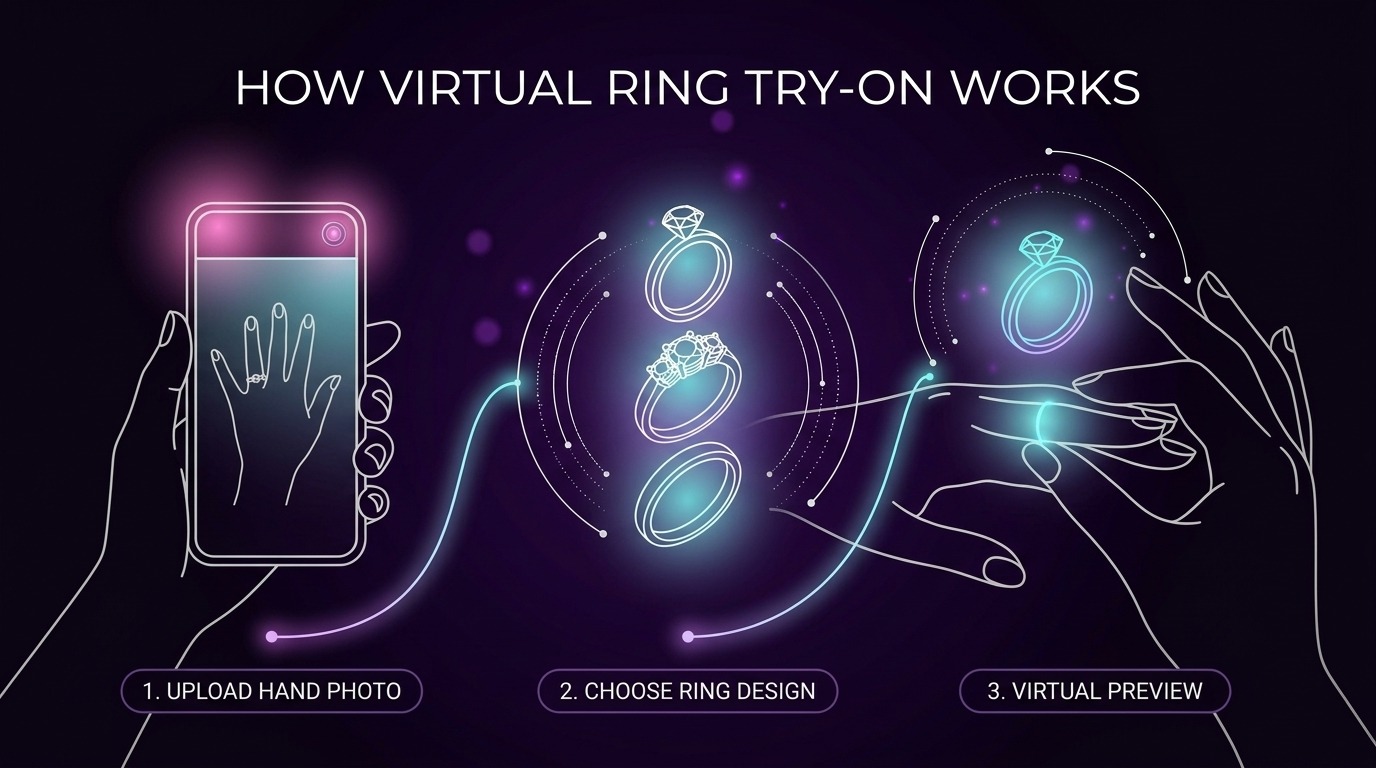
1. Snap a clear photo of your hand
Make sure the finger you want to try the ring on is easy to see in the shot. And don't skip good lighting. Standing near a window for this makes a bigger difference than you'd think. A well-lit, steady photo gives you a way more accurate preview than a dark, shaky one.
2. Pick your ring
Browse the site's options and choose a design, or if the tool allows it, just upload a photo of the exact ring you already have your eye on. Some tools also let you filter by stone shape, band style, or metal color, which helps if you're comparing a few options at once.
3. Let the tool work its magic
This is the fun part. It reads both photos, figures out exactly where the ring should go, and places it so it actually looks like it's sitting on your hand — not just stuck on top like a sticker.
5. Try a bunch of different styles
Swap the band, change the stone shape, play with different settings or metal colors — all on the same hand photo, so you can genuinely compare them side by side instead of guessing from memory.
Why Online Ring Try-On Is More Than Just a Cool Feature
Virtual ring try-on might look like a fun extra, but there’s a practical reason it can be useful. You get to see the ring in relation to your own hand, rather than trying to judge it from a product photo.
A 2025 study involving 108 participants tested AR jewelry try-on and found that unfiltered virtual try-ons increased the feeling that the jewelry suited the person wearing it. That sense of personal fit was then linked to more positive opinions about the product and stronger purchase intention.
And that makes sense when you think about how people actually choose rings. A ring might look beautiful on a website, but what really matters is whether you like the way that design looks on your own hand.
That's where virtual try-on becomes useful. You can compare different bands, stone shapes, settings, and metal colors without having to imagine each one from a separate product photo.
It doesn't make the buying decision for you. It simply gives you a better visual reference before you decide.
What to Expect From Your Ring Try-On Online Preview
Here's the honest expectation to set going in: ring try-on online gives you a realistic sense of how the ring sits on your hand. You should see the shape, band, stone, and metal color clearly, without having to imagine it from a regular product photo anymore.
The quality actually depends on you a little, too. A clear, well-lit hand photo helps the tool match the ring's size, angle, and shadows properly, so a shot near a window will always beat one taken in a dim room.
A few other things worth keeping in mind:
Your hand's natural position matters. A relaxed, flat hand with your finger visible gives ring try-on online a much easier job than an angled or curled shot, because the tool needs a clear view of your finger to place the ring accurately.
Different rings need different checks. A thin band will show fit and proportion clearly, but a chunky stone or an unusual setting can be harder for any tool to render perfectly. So give those a slightly more critical eye rather than trusting the preview completely.
A good ring try-on online preview should leave you thinking, "okay, now I can actually picture this on me." Nothing more complicated than that.
Where It Falls Short (So You're Not Surprised)
Worth being upfront about a few limitations:
A virtual ring preview can make online shopping much easier, but it has its limits. It shows you how the ring may look, not everything you'll experience when you actually wear it.
For example, it can't tell you whether the ring feels comfortable, how heavy the metal is, or whether the band feels too wide between your fingers. It also shouldn't be used as your final ring-size measurement.
The real ring may also look slightly different in person. Gemstones can change with lighting, and small details such as metal finish and stone sparkle are difficult to reproduce perfectly in a generated image. Your photo matters, too. A clear, well-lit image can give you a much better preview than a dark or blurry one.
So, use ring try-on online for what it's good at: getting a better feel for the design before you buy it. Then check the actual measurements, sizing, materials, and other product details before making the final decision.
Final Word
At the end of the day, ring try-on online solves the one part of online ring shopping that always felt a little impossible, actually seeing it on your own hand before you commit. Upload a photo, try on a few designs, compare them side by side, and you'll know, not guess, what genuinely looks right on you.
It's not a replacement for getting sized properly or holding the real ring in your hands eventually, because, after all, nothing really replaces that experience. But it does mean you're no longer deciding based on a product photo and a bit of hope.
If you've got a ring in mind, why not actually see it on your hand first? Try it here and get your preview before you buy.
FAQs
How does ring try-on online work?
You upload a clear photo of your hand, choose or upload a ring design, and the tool creates a virtual preview of the ring on your finger. Some systems adjust the ring's position, angle, and proportions to make the result look more natural.
Can I use a photo of a ring I found online?
Yes, if the tool supports ring-image uploads. Using the actual ring photo can help you preview that specific design rather than a similar style.
What kind of hand photo gives the best result?
Use a clear, sharp photo with good natural lighting and make sure the finger you want to try the ring on is easy to see. Harsh shadows, blur, or an awkward angle can affect the preview.
Will the virtual ring show my exact ring size?
Not necessarily. A virtual preview can help you judge the ring's appearance and proportions, but it shouldn't replace professional sizing before you buy.
Find Your Perfect Ring in Seconds
Stop guessing and start seeing. Our AI-powered virtual ring checker analyzes your preferences to reveal the perfect diamond for you. It's fast, fun, and finds your fit.
Try Our AI Checker Now