
For years, buying an engagement ring meant the same routine: standing in a store, peering through a loupe, and trying to picture how it would look once it was real. Most of the conversation stuck to the 4Cs too (cut, color, clarity, carat), which are numbers on a certificate that never once showed you how a ring would actually look on your hand.
Virtual try-on for engagement rings changes that. Upload a photo of your hand and you get to see the ring right on your own hand before deciding anything. The 4Cs still matter, and a try-on finally shows you what those numbers alone never could. Here's how ring try on is making online ring shopping feel a lot more practical.
Let's get into it!
What Is Virtual Try-On for Engagement Rings?
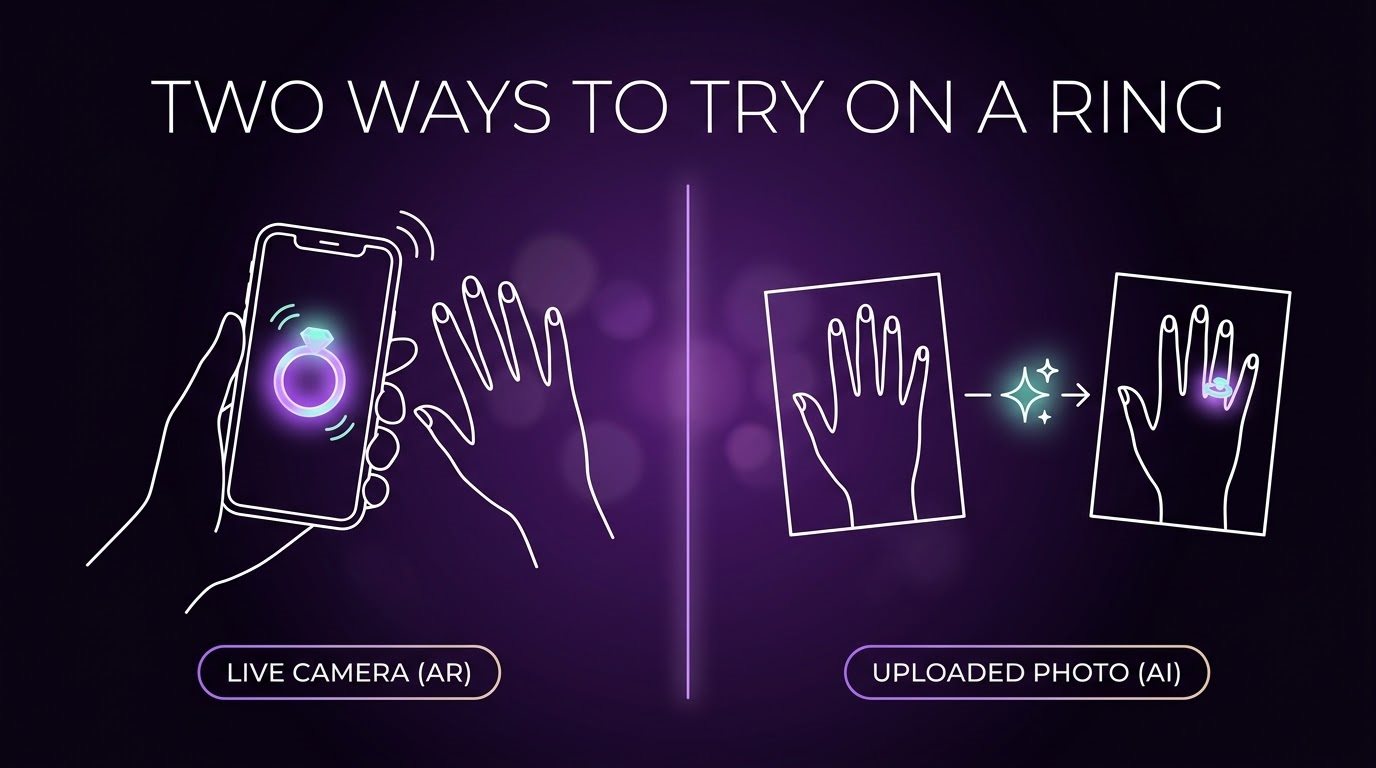
A virtual engagement ring try-on is a tool that shows you a realistic image of a ring sitting on your own hand before you buy it, without setting foot in a store. Two different technologies make that happen, depending on the platform.
AR-based tools run through your phone's camera in real time. Computer vision tracks your finger position, then overlays a 3D model of the ring onto the live video, moving as you turn your hand. It feels the most like trying something on, although it only works if the retailer has already built that exact ring as a 3D file.
AI-generated tools work from a single uploaded photo instead. The AI detects your hand, identifies the correct finger, estimates its size and angle, then generates a brand new image with matching lighting and shadows instead of overlaying anything pre-built. This tends to look the most realistic, since it handles the whole scene together. It's also how Ring Try On works.
A newer layer sits on top of both: some platforms, including ours, let you upload a photo of literally any ring, including ones outside a single store's catalog. Upload your hand, upload the ring, and the AI places the two together, so a ring from a small designer's site or even a vintage find works just as well as anything from a major retailer.
Why Try an Engagement Ring Virtually?
A ring can look perfect in a product photo and still feel different when you see it on your own hand. Studio lighting and carefully chosen angles don't tell you everything. You may still wonder how large the stone looks, how high the setting sits, or whether the style suits your hand.
That's where virtual try-on comes in. Instead of guessing from a photo, you can see the ring on your own hand before buying. It gives you a much better idea of what the design may look like in real life, and seeing the ring on your own hand adds a lot of confidence to your ring shopping.
There are some interesting numbers behind it, too. Jewelry retailer Jewlr saw a 10.4% increase in conversion rate and a 15.38% increase in revenue per visitor after adding virtual try-on, according to a Tangiblee case study.
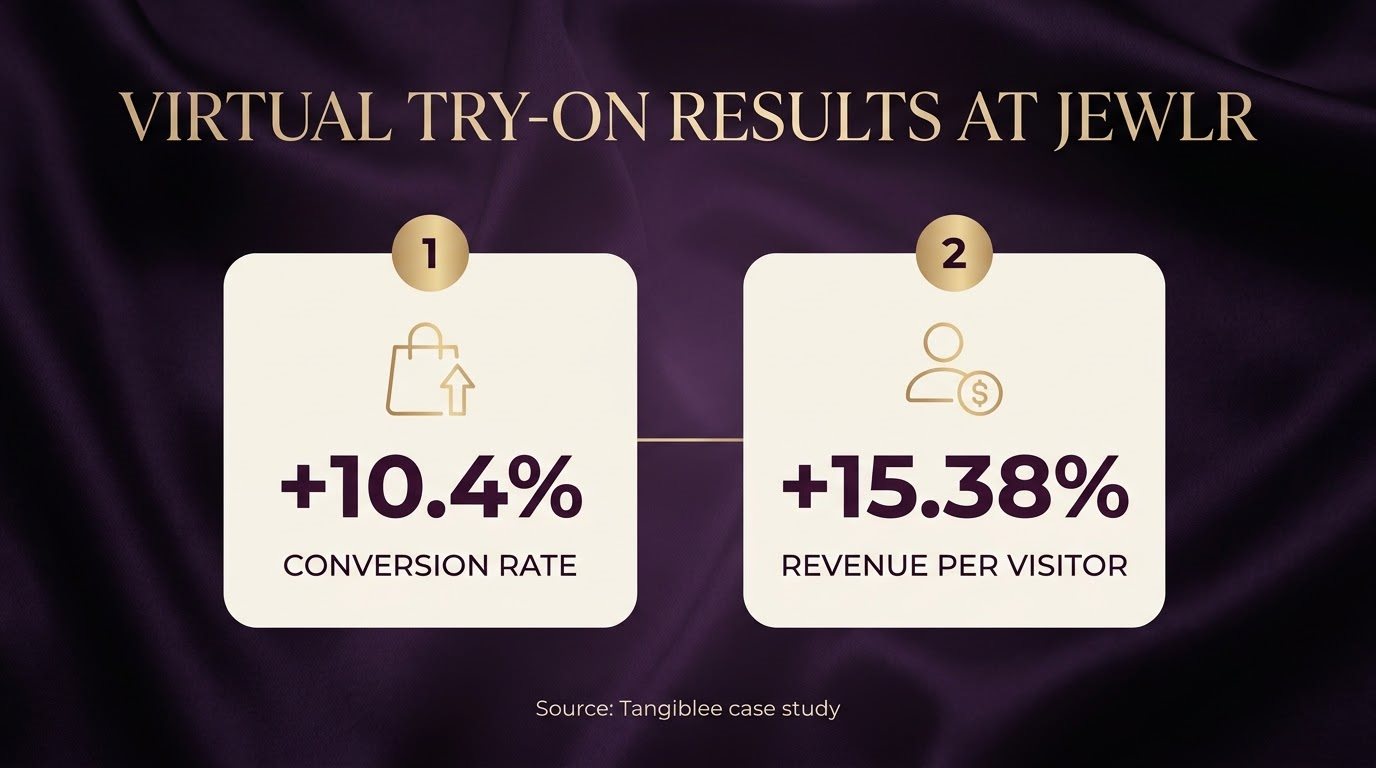
Source: Tangiblee
So virtual try-on is more than a fun way to put a ring on your screen, because it answers the question product photos can't: "How will this actually look on me?"
How Does Virtual Engagement Ring Try-On Work?
Most tools follow a similar sequence, even if the interface looks a little different from platform to platform. Here's what happens once you open one up:
Pick a Ring to Start With
Browse the catalog and choose a ring to preview. Some platforms pull from multiple brands and independent designers, while others only show one jeweler's own stock, which matters if you're comparing across a few retailers rather than sticking with one.
Give It a Hand to Work With
Upload a clear photo of your hand (or your partner's, if you're planning something), or turn on your camera if the platform supports live view. Natural light near a window and a plain background both help a lot here. A blurry, dark, or awkwardly angled photo weakens everything that happens after it, since the system has less to work with.
Watch It Map and Place the Ring
The software scans the photo to find key points across your fingers, knuckles, and joints, then uses those to figure out where the ring finger is, how wide it is, and what angle your hand is at. From there, it scales the ring and places it to match, adjusting so it doesn't look flat or like it's floating above the skin.
Start Comparing Rings on the Same Hand
This is the part worth slowing down for. Try a ring with a different stone shape, then another in a different metal, then a halo instead of a solitaire. Each one appears on the exact same hand photo, so you get a real side-by-side comparison instead of trying to remember what the last option looked like five tabs ago.
What's Actually Worth Checking Here?
A virtual try-on can't tell you everything about a ring, but it does answer specific, useful questions that are hard to figure out from a product photo alone.
Whether a stone looks the size you expect. A diamond that grabs attention on screen can look surprisingly small once it's on a hand, and the reverse happens too. Comparing a 0.8-carat ring against a 1.2-carat one on your own hand settles this in a way a spec sheet never can.
Whether the shape suits your hand specifically. Round, oval, and cushion shapes each carry different proportions and finger coverage, and a ring that looks petite on longer fingers can appear noticeably larger on shorter ones. Seeing that difference on your own hand matters more than most people expect.
Whether the setting looks proportionate. Whether it's a solitaire, halo, three-stone or pavé design, most people struggle to picture how a setting will look until they see it on a hand, since the same setting can shift dramatically in visual weight from one hand shape to the next.
Whether the metal tone works against your skin. A good try-on renders yellow gold, white gold, rose gold, and platinum realistically enough that you can judge which one complements your skin tone, rather than guessing from a swatch or a small thumbnail image.
Whether the full combination comes together. Many engagement rings combine a chosen stone with a specific setting, metal, and band style, and seeing the finished design on your own hand is the easiest way to judge the whole thing before committing.
These details matter because an engagement ring is worn and looked at daily. A design that looks flawless in a studio product photo doesn't always hold up once it's placed on a hand. The sparkle, the band thickness, and the way the proportions sit are hard to judge from an image without the right context, and that gap between what you expect and what shows up is exactly what virtual try-on exists to close.
The Most Practical Application of Ring Try-On
Comparing rings side by side is where ring try-on earns its keep the most, and it solves a real problem: decision fatigue hits fast during ring shopping. With too many choices in a short window, the brain starts struggling to judge any single one clearly. Anyone who's spent hours flipping between diamond shapes and debating white gold vs. platinum knows this feeling.
Say you've narrowed things down to three rings: a solitaire, a halo, and something with a more detailed band. Judging them in separate browser tabs makes a fair comparison nearly impossible, since you're comparing your memory against a new image each time.
Comparing them virtually, on the same hand, produces a much clearer result. A design that seemed like the obvious favorite alone might not hold up once it's placed next to the alternatives, and something you nearly scrolled past can turn out to be the stronger choice once you see it in context.
Some retailers add other tools on top. James Allen, now a collection inside Blue Nile, shows each diamond in 360° HD video at up to 40x magnification, so you can check cut and clarity in a way a standard product photo doesn't show.
Is Virtual Try-On for Engagement Rings Worth Using?
Yes, it's worth using, as long as you're clear-eyed about what it does well and where it falls short instead of treating it like magic.
For shoppers, the real value is that it removes the worst part of online ring shopping: staring at a product photo and hoping. It won't make the decision for you. You still have to think, compare, and eventually commit, but you're doing that with an actual visual reference instead of pure imagination, which is a meaningful upgrade.
For retailers, the case is arguably stronger. Jewlr's numbers above point to higher conversion, and shoppers arrive at checkout having already ruled out the styles that clearly weren't going to work, instead of discovering that the hard way after the ring has shipped.
Where you shouldn't over-rely on it is sizing, weight, and how a ring feels day to day. Those still need a real fitting.
Final Word
Choosing an engagement ring used to mean committing on the spot, or walking away hoping memory would carry you through later. Virtual try-on takes that pressure off. You get to see the ring on your own hand, at your own pace, with no salesperson watching the clock.
Instead of imagining how five different settings might look based on five different product photos, you can compare them side by side on the same hand and see which one feels right.
Ready to see it for yourself? Try your engagement ring on here and see how it looks on your own hand before you decide anything.
FAQs
How accurate is virtual ring try-on?
It's accurate enough to compare styles with real confidence. The better tools place the ring precisely on your finger and render metal tones and sparkle realistically, so what you see closely resembles how the ring will look once it's real.
Can it tell me my exact ring size?
No. A try-on shows how big the ring looks on your hand, which helps you compare styles, but it doesn't measure your finger. Get an actual sizing check before ordering.
Does it work for every ring style?
Yes, most well-built tools comfortably handle solitaires, halos, three-stone settings, pavé bands, and all the major diamond cuts, including round, oval, cushion, and emerald.
Can I use it to plan a proposal without giving anything away?
Yes, and it's one of the more popular uses. Upload a candid photo of their hand taken without explanation, and compare styles completely in secret.
Is virtual ring try-on free to use?
Usually, yes, at least to start. Most platforms offer a handful of free tries or credits, with paid options available if you want to keep exploring more styles after that. Ring Try On gives you 2 free credits when you sign up.
Find Your Perfect Ring in Seconds
Stop guessing and start seeing. Our AI-powered virtual ring checker analyzes your preferences to reveal the perfect diamond for you. It's fast, fun, and finds your fit.
Try Our AI Checker Now