
Engagement ring shopping can easily turn into a scrolling session. You find one ring you love, then another, then another. You save them, compare them, send screenshots to your partner or someone you trust, and still can't decide which one you'd actually want to wear.
There's a good reason for that: you haven't seen the rings on your own hand yet.
An engagement ring virtual try-on gives you a way to do that before buying. Upload a photo of your hand, choose a ring, and see a preview of how it looks on your finger. You can switch between different designs and see which ones feel more like your style.
So how does it work, how can you try on an engagement ring from home, and how can ring try on help you choose yours?
Let's get started!
What Is an Engagement Ring Virtual Try-On?
An engagement ring virtual try-on lets you see how a ring looks on your own hand before you decide to buy it.
On any virtual ring try on app or tool, you just upload a photo of your hand, choose a ring, and the tool creates a preview of that ring on your finger. Instead of looking at the ring only on a model or in a product photo, you can see how the stone, band, and setting look against your own hand.
This can be helpful when you're comparing different designs. You can try an oval, round, pear, or cushion-cut stone and see which shape you prefer. You can also compare different band widths and settings, such as solitaire, halo, or three-stone designs.
It gives you a better idea of the overall look and proportions of a ring before you spend money on it. You can quickly try several options, remove the ones you don't like, and focus on the designs that work for you.
How Does an Engagement Ring Virtual Try-On Work?
Trying an engagement ring virtually is pretty simple. You give the tool a photo of your hand, choose a ring, and it creates a preview of that ring on your finger. From there, you can compare different designs and decide which ones are worth considering.
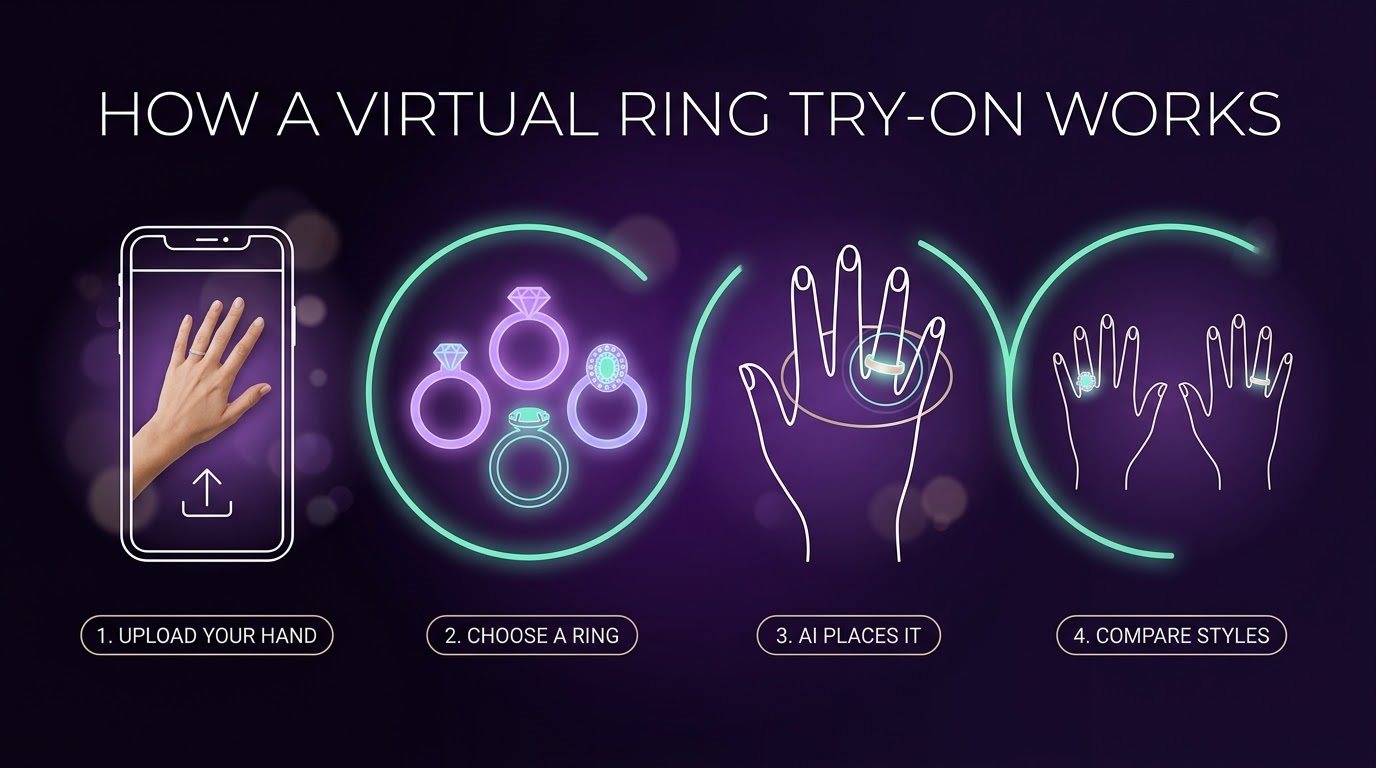
1. Upload a Photo of Your Hand
Start by uploading a clear photo of the hand where you want to see the engagement ring. Keep the finger visible, use good lighting, and avoid covering it with another ring or your other fingers. A clear photo gives the tool a better view of your hand and makes it easier to position the ring.
Some tools also let you use your phone's camera instead. In that case, you can see the ring through a live camera view rather than using a saved photo.
2. Choose the Engagement Ring
Once your hand photo is ready, choose the engagement ring you want to try. Depending on the tool, you may have different stone shapes, settings, band styles, and metal options to compare.
For example, you can see how an oval, round, pear, or cushion-cut stone looks on your hand. You can also compare a simple solitaire with a halo or three-stone setting without switching between different product photos.
3. The Tool Detects Your Finger
After you choose the ring, the software analyzes your photo to find your hand and the finger where the ring should appear. It uses the position and shape of your finger to determine where to place the digital ring.
This is where technologies such as AI, computer vision, or augmented reality (AR) may be used. The exact process depends on the tool, but the goal is the same: recognize your finger and place the ring in the right spot.
4. The Ring Is Placed on Your Finger
The tool then adds a digital version of the engagement ring to your finger. Depending on the system, it may adjust the ring's position, angle, and scale to match the way your finger is positioned in the photo.
This helps the preview look more natural. Instead of simply putting a ring image over your hand, the software tries to make the ring follow the direction and position of your finger.
5. Check How the Ring Looks on Your Hand
Now you can focus on the part that matters most: how much you like the ring on your hand. Look at the center stone, band width, setting, and overall proportions.
A ring that looks great on a model might look different on your own finger. The virtual preview gives you a chance to notice those differences and decide whether the design matches what you had in mind.
6. Compare Different Engagement Rings
You can repeat the process with other rings and compare the results. Try different stone shapes, settings, or band widths to see which combinations you prefer.
This is particularly useful when you have narrowed your search down to a few favorites. Instead of guessing from product photos, you can see each option on the same hand and make a more informed comparison.
The Styling Options Worth Comparing
If you're unsure about your style, don't lock yourself into the first ring you happened to like. Try a handful of different designs and see how they compare on the exact same hand, instead of jumping between five different product photos and trying to remember which one felt right.
These are worth putting side by side:
- Oval vs. round
- Pear vs. cushion
- Solitaire vs. halo
- Thin band vs. wider band
- Simple setting vs. something more detailed
You might already have a favorite style sitting in your head, but seeing a few real options on your own hand often changes the picture more than you'd expect. Sometimes it confirms what you already loved, and sometimes it flips your opinion completely. A halo you assumed would be "too much" might look great on your hand, and a simple solitaire you almost skipped past might turn out to be exactly what suits you.
And if you're shopping with a partner, this makes the whole process a lot smoother too. Instead of sending over a dozen product links and hoping they can somehow picture what you mean from a paragraph of description, you can show them the actual comparison on the same hand, which is a much easier conversation than trying to describe five rings over text.
Can Virtual Try-On Help With Ring Size?
Not really, and it's worth understanding why. A virtual ring try-on gives you a rough sense of proportion, but it was never built to nail down your exact ring size.
How big a ring looks in a preview depends on your photo, the camera angle, your screen, and even how the tool itself generates the image. So a ring that looks like a perfect fit on your screen doesn't tell you much about whether it'll fit your real finger.
For actual sizing, skip the guesswork and use a proper ring sizer or follow the jeweler's own instructions. It's worth checking the ring's real measurements too, especially the center stone dimensions, instead of trusting whatever the preview shows you.
Basically, let virtual try-on answer "do I like how this looks?" and leave "will this fit me?" to an actual sizer. They're two different questions, and the preview can only help with one of them.
How to Get a Better Virtual Try-On
You don't need a professional photo for a virtual ring try-on. A clear phone photo is usually enough. A few small things can make the preview easier to see and compare, though.
Take a clear photo. Make sure your hand isn't blurry and the finger you're trying the ring on is easy to see.
Use good lighting. Natural or even lighting works well. Try to avoid strong shadows that hide parts of your finger.
Keep your hand relaxed. Hold your hand in a natural position instead of stretching or bending your fingers just for the photo.
Remove other rings. If you're trying an engagement ring on your ring finger, keep it free so nothing gets in the way of the preview.
Use the same photo when comparing rings. This keeps your hand in the same position, making it easier to compare different designs fairly.
A better photo won't make the virtual ring identical to the real one, but it can give you a clearer idea of how different designs look on your hand.
So, When Should You Try the Real Ring?
A virtual try-on is great while you're still narrowing down styles, but once you've landed on one or two real favorites, it's time to go touch the actual ring, because that's where a digital preview hits its limit.
If a jeweler's nearby, check whether they've got the exact design, or something close, to try on. Move your hand around instead of holding still for a photo. Does the setting feel comfortable? Does it catch on anything? How does it look from angles a flat preview never shows you?
If you can't try the exact ring in person, be extra careful checking the specs and the seller's return policy before ordering. That's your safety net when a real try-on isn't an option.
Final Word
Choosing an engagement ring online doesn't have to mean squinting at a product photo and just hoping. An engagement ring virtual try-on gives you a real way to see different designs on your own hand, compare your options, and narrow things down before spending a dollar.
Just remember what it's good for: helping you judge the look. When you're ready to buy, still check the real ring's size, specs, and return policy, because a preview can't replace that part.
If you want to try a ring on yourself, give it a shot right here.
FAQs
Can I try an engagement ring on my hand online?
You can, as long as the virtual try-on tool supports it. Most tools let you upload a photo of your hand, while some also offer a live camera option. You can then choose an engagement ring and see a digital preview on your finger.
Can I try different engagement ring styles?
That's one of the main benefits of virtual try-on. You can compare different stone shapes, settings, and band styles to see which designs you prefer on your hand before narrowing down your choices.
Does virtual try-on show the exact ring?
It shows a digital representation of the ring, so you shouldn't treat the preview as an exact replica of the finished piece. Details such as the actual size, finish, materials, and how the ring looks in person can differ. Always check the product specifications before ordering.
Can virtual try-on tell me my ring size?
A virtual preview isn't a reliable way to determine your exact ring size. Use a proper ring sizer or follow the jeweler's recommended sizing method. If you're buying online, check the seller's sizing guide before placing your order.
Is virtual try-on the same as trying on a real ring?
Not quite. Virtual try-on helps you judge the appearance and overall design on your hand. Trying on the actual ring lets you experience things a digital preview can't show, such as its weight, comfort, height, materials, and how the setting feels on your finger.
Find Your Perfect Ring in Seconds
Stop guessing and start seeing. Our AI-powered virtual ring checker analyzes your preferences to reveal the perfect diamond for you. It's fast, fun, and finds your fit.
Try Our AI Checker Now